Capture Everywhere
Record processes from your wrist, pocket, or desk
ValueStream runs on every device you carry. Start a recording on your Apple Watch while walking the factory floor. Review it on your phone. Analyse it on the web. Everything syncs in real-time.
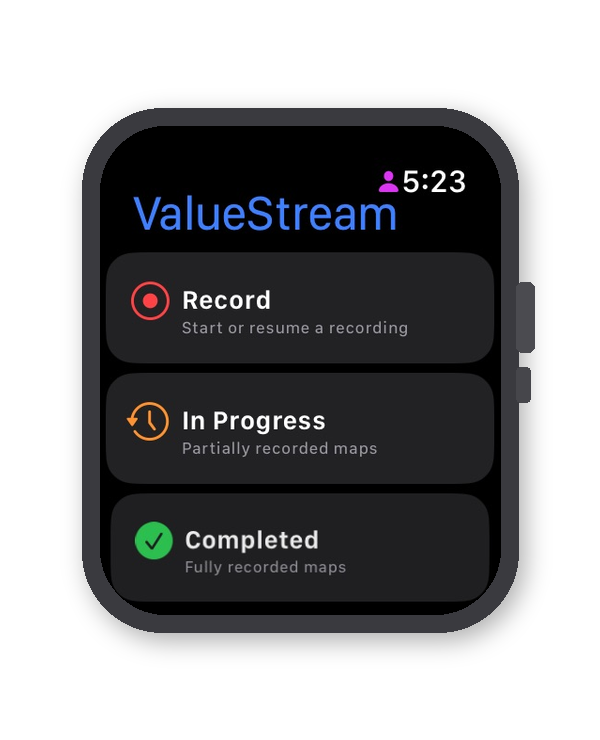 Apple Watch
Record from your wrist
The ultimate hands-free process recording tool. Walk the gemba, time each step, and capture observations without carrying a phone or clipboard. Perfect for manufacturing floors, construction sites, and healthcare environments.
Standalone app - works independently without iPhone nearby
ValueStream Mobile
Your complete process recording studio in your pocket. Photo evidence, NFC scanning, GPS tracking, offline recording, and full analytics - all synced to MapVS.com the moment you're back online.
- One-Tap Step Timing - start/stop with a single tap, VA/NVA classification in real-time
- Photo & Annotation - capture and mark up photos of each step as evidence
- NFC Asset Scanning - scan equipment tags to auto-identify stations and trigger step timing
- GPS Waypoint Timing - set start/end coordinates and auto-time travel between locations
- Resource Isolation - individual workers time their own stages independently
- Offline First - record without internet, sync when connected
- Watch Companion - see Watch recordings live, generate pairing codes
- Kanban Improvements - track and manage improvement actions on the go
iOS 16+ · iPhone & iPad · Free with MapVS account
ValueStream Recorder
Capture screen-based processes on Windows, Mac, or Linux. Auto-detects application changes, captures screenshots at intervals, and tracks idle time. Perfect for software workflows, ERP processes, and office work.
- Screen Recording - auto-capture screenshots at configurable intervals
- Region Capture - focus on specific areas of the screen
- Idle Detection - automatically tracks wait times and breaks
- Monte Carlo Simulation - quick what-if analysis from recorded data
- Live Recording Alerts - see when Watch/Mobile is recording
Why ValueStream Apps
Features no other VSM tool offers
GPS Waypoint Auto-Timing
Set start and end GPS coordinates for a stage. When a worker moves between waypoints, the step timer starts and stops automatically. Perfect for delivery routes, site-to-site transfers, and logistics flows.
NFC-Triggered Recording
Stick NFC tags at workstations. Scanning a tag automatically starts or stops the relevant step timer. No buttons to press, no screen to look at. The process itself controls the recording.
Resource Isolation
Each worker selects their role and only sees their stages. Multiple people record simultaneously, and results merge into one unified value stream map. Get parallel cycle times, not just sequential observations.
Cross-Device Live Sync
Start a recording on your Watch. Your phone shows a live progress banner. Your web dashboard updates in real-time. When the Watch stops, the data is already there. No cable, no export, no delay.
Hands-Free Recording
On Apple Watch, raise your wrist to resume recording, lower it to pause. Walk the process with both hands free. Haptic buzzes alert you when a step exceeds its benchmark - no screen required.
Voice-First Observations
Dictate notes per step on your Watch or phone. Observations are transcribed and attached to the step data. No typing, no writing. See something, say something - it's captured.
DES with Animated Playback
Discrete Event Simulation animates work items flowing through your value stream on the canvas. See queues build, bottlenecks form, and throughput constraints emerge in real time. Monte Carlo with statistical distributions for confidence intervals.
OEE & Shift Calendars
Overall Equipment Effectiveness calculated per station. Assign shift calendars (day/night/rotating) to individual stations for accurate available time, takt time, and simulation inputs. Feeds directly into your data boxes.
Recording Runs & Comparison
Every recording creates a numbered run (Run #1, #2, #3...). Compare runs side by side to track improvement. Re-record individual steps without repeating the whole process. Per-step history with min/max/avg/median statistics.
How It Works
Record, Review, Analyse, Improve
Walk & Record
Observe the process. The app times each step, captures your location, and records your voice notes. You focus on watching - the app handles the data.
Review & Adjust
Back at your desk, review captured steps. Edit names, adjust classifications, add context. Everything's editable before committing.
Analyse
Your recording becomes a value stream map with full analytics - PCE, bottlenecks, waste classification, Monte Carlo simulation, and AI-powered insights.
Improve
Track improvements with the built-in Kanban board. Re-record the process to measure impact. Compare before and after. Prove the ROI.
The Data Model
Maps, Runs & Analysis
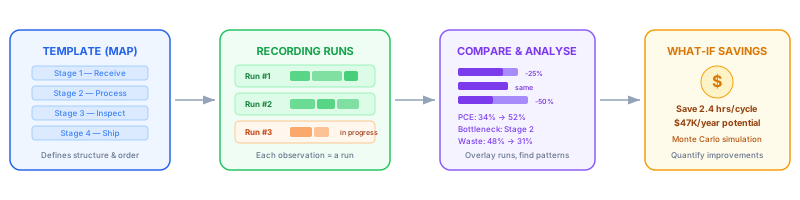
Every recording app follows the same structure: a template defines the stages, each recording creates a numbered run, and the platform compares runs to find savings.
REST API
Build your own integrations. The same API that powers our apps is available to all subscribers. Push data from PLCs, ERPs, or custom tools directly into your value stream maps.